


How to view photo metadata
- 1
Add a photo
HEIC, HEIF, JPG, PNG and WebP are supported.
- 2
Read the details
Camera, exposure, image and location data are shown in clear groups.
- 3
Remove if needed
Found a location you do not want to share? Use Remove Metadata.
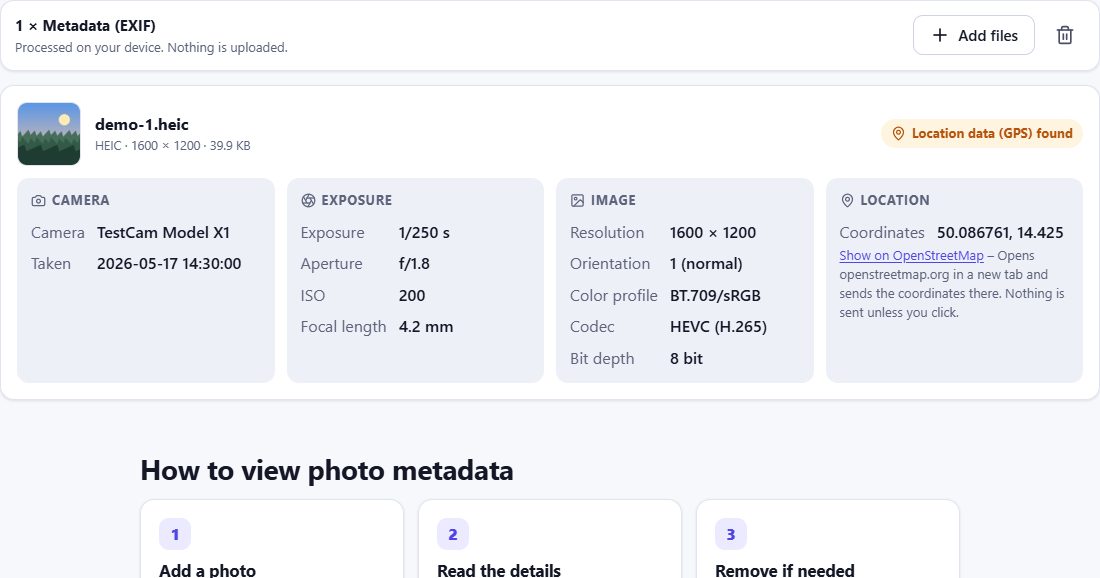
What EXIF data shows
| Date and time | when the photo was taken |
| Make and model | e.g. Apple iPhone 15 Pro |
| Lens, focal length | which camera module was used |
| ISO, exposure, aperture | shooting settings |
| Orientation | how the photo should be rotated |
| GPS | latitude, longitude and altitude |
| Color profile | e.g. Display P3 or sRGB |
GPS stays on your device
Coordinates are shown as numbers only. No map is loaded automatically, so your location is not sent to any map service. If you want to see the place on a map, you can click a link to OpenStreetMap – only then are the coordinates sent there.
Frequently asked questions
Do iPhone photos contain my location?
If location access is enabled for the camera, yes – each photo stores the GPS coordinates where it was taken.
Can websites see my photo’s location?
If you upload the original file, the website can read the GPS data. Many social networks remove it, but not all services do.
Why does my photo show no EXIF?
Screenshots, edited exports and photos from messaging apps often have no EXIF – it was removed earlier.
Is the EXIF viewer private?
Yes. Metadata is read in your browser and nothing is uploaded.