HEICStudio

HEIC to WebP Converter for Faster Websites

Convert iPhone photos to WebP – the modern web format that is typically smaller than JPG at comparable quality. Free, private and without uploads.

Drop HEIC Files to Convert to WebP

Or click to browse your photos

Choose Files

HEIC, HEIF, JPG, PNG, WebP · as many files as you like

  • 100% Private
  • No Upload Required
  • Free Batch Conversion
  • High-Quality Output

How to convert HEIC to WebP

  1. 1

    Add your photos

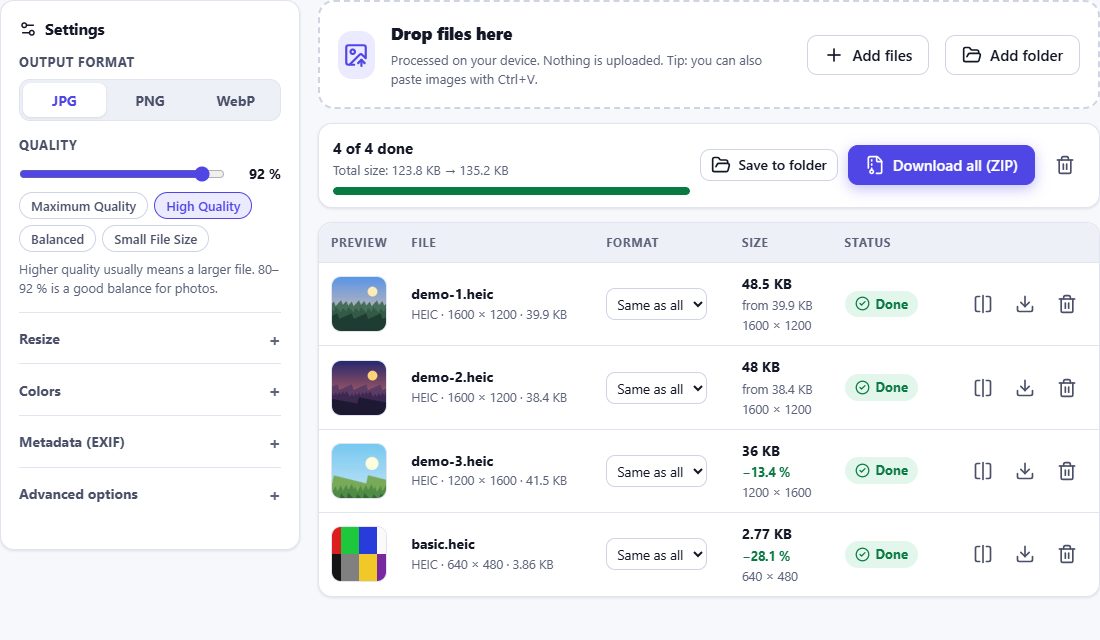
    Drop HEIC, JPG or PNG files onto the box. WebP is pre-selected.

  2. 2

    Set quality and size

    For websites, 75–85 % quality and a maximum width of 1600–2560 px is usually enough.

  3. 3

    Download WebP

    Download the images one by one or as a ZIP and upload them to your website.
HEIC to WebP – HEIC Studio
HEIC to WebP Converter for Faster Websites

Why WebP?

WebP is supported by all current browsers and is widely used for web images. Compared with JPG it typically produces smaller files at similar visual quality, which helps page speed and Core Web Vitals. WebP also supports transparency, unlike JPG.

The size difference depends on the photo – HEIC Studio shows the actual size of every converted file, so you can compare it with JPG.

Browser support for creating WebP

Creating WebP files requires a browser with a WebP encoder – Chrome, Edge, Opera and Firefox have one. Safari can display WebP but cannot create it from a canvas. If your browser cannot produce WebP, HEIC Studio says so clearly instead of quietly saving a different format.

Frequently asked questions

Is WebP better than JPG?
For websites, usually yes: smaller files at the same visual quality, plus transparency. For printing, e-mail and older software, JPG is more compatible.
Can I convert WebP back to JPG or PNG?
Yes. Use the HEIC converter – it also converts JPG, PNG and WebP files between each other.
Why can’t I create WebP on my iPhone?
Safari does not include a WebP encoder for canvas images. Use JPG on iPhone, or Chrome/Firefox on a computer.
Does WebP keep EXIF data?
Yes, if you choose “Preserve supported metadata”, EXIF is stored in the WebP EXIF chunk.