HEICStudio

Free HEIC to JPG Converter – Fast, Private & Online

Convert HEIC and HEIF photos to JPG, PNG or WebP instantly in your browser. No uploads, no signup, no software installation.

Drop HEIC Files Here

Or click to browse your photos

Choose Files

HEIC, HEIF, JPG, PNG, WebP · as many files as you like

  • 100% Private
  • No Upload Required
  • Free Batch Conversion
  • High-Quality Output

How to convert HEIC to JPG

  1. 1

    Add your photos

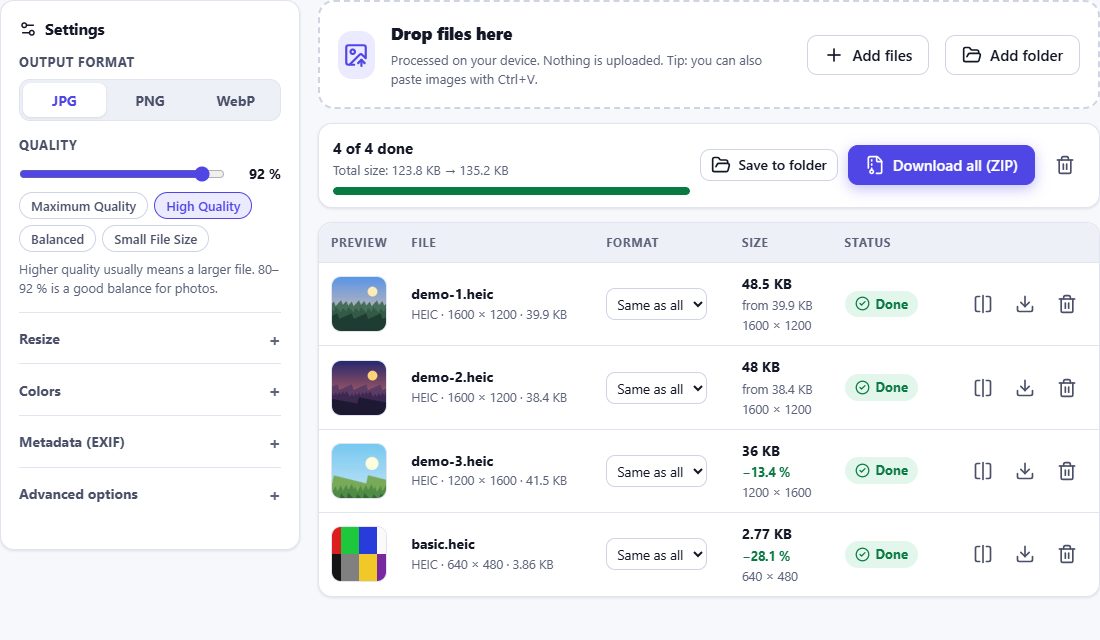
    Drop HEIC files onto the box above or click Choose Files. You can add one photo or hundreds at once.

  2. 2

    Pick format and quality

    JPG is selected by default. Choose a quality preset, resize if you need smaller photos, and decide what happens to location data.

  3. 3

    Download

    Each photo can be downloaded on its own, or all of them together as a single ZIP archive.
HEIC to JPG – HEIC Studio
Free HEIC to JPG Converter – Fast, Private & Online

Why convert HEIC to JPG?

iPhones and iPads save photos as HEIC (High Efficiency Image Container) because the format is roughly half the size of a JPG of similar quality. The catch: many Windows programs, older Android phones, online forms, printing services and websites still cannot open HEIC files. JPG opens everywhere, which makes it the safest format for sharing, uploading and archiving.

HEIC Studio uses the HEIC decoder built into your browser and keeps the original resolution unless you choose to resize.

Your photos never leave your device

Most online converters upload your photos to a server. HEIC Studio does not. Photos are decoded by your browser and converted on your device, so private pictures – family photos, documents, screenshots – are never sent anywhere. Once the page has loaded, the converter even works without an internet connection.

Location (GPS) data is removed by default. You can keep the date, camera and exposure details, or remove every piece of metadata. See the privacy page for details.

Quality that matches the original

  • Correct orientation – rotation stored in the photo is applied, so photos never end up sideways.
  • Consistent colors – colors are converted to sRGB, so the photo looks the same in every app and on every website.
  • Full resolution – nothing is reduced unless you ask for it.
  • Adjustable quality – from maximum quality to small files for e-mail.

Frequently asked questions

Is this HEIC to JPG converter really free?
Yes. All tools are free, without registration, watermarks or limits on the number of photos. The site is funded by advertising.
Are my photos uploaded to a server?
No. Photos are decoded and converted inside your browser. Nothing is uploaded – you can check this in your browser’s network panel or by converting with the internet switched off.
How many HEIC files can I convert at once?
There is no fixed limit. Files are processed in a queue, a few at a time, so even hundreds of photos can be converted without overloading your device. For very large batches, see the batch converter.
Will the JPG lose quality?
JPG is a lossy format, but at the High Quality preset (92 %) differences are practically invisible. Choose Maximum Quality for the best result or PNG for lossless output.
Which browsers can open HEIC files?
HEIC photos are decoded by the browser’s built-in decoder, available in Safari on iPhone, iPad and Mac (iOS, iPadOS and macOS 17 or newer). Chrome, Edge and Firefox cannot open HEIC; they can still convert JPG, PNG and WebP and read or remove metadata. On Windows, see how to convert HEIC on Windows.
What happens to the date and location of my photos?
By default the GPS location is removed and other EXIF data (date, camera, exposure) is kept. You can change this in the settings to remove all metadata or keep it.