


How to remove photo metadata
- 1
Add photos
HEIC, JPG, PNG and WebP are supported, also several at once.
- 2
Choose what to remove
Remove all metadata or Remove GPS only – the latter keeps date and camera details.
- 3
Download the clean files
Every result is read back and checked. Download files one by one or as a ZIP.
Lossless removal
Unlike most tools, HEIC Studio does not decode and re-encode your photo. It removes the metadata blocks directly from the file: EXIF and XMP segments in JPG, eXIf and text chunks in PNG, EXIF/XMP chunks in WebP. HEIC files keep their HEIC format – the EXIF data is overwritten in place. The picture quality stays exactly the same.
What is kept
- The color profile (ICC) – it contains no personal data and removing it would change colors.
- For JPG, the orientation tag – otherwise the photo would be displayed rotated.
- With “Remove GPS only”, all other EXIF data such as date and camera.
The embedded preview thumbnail is always removed, because it could show the uncropped original.
Frequently asked questions
Does removing metadata reduce quality?
No. The image data is copied unchanged; only the metadata blocks are removed or overwritten.
How do I know the GPS data is really gone?
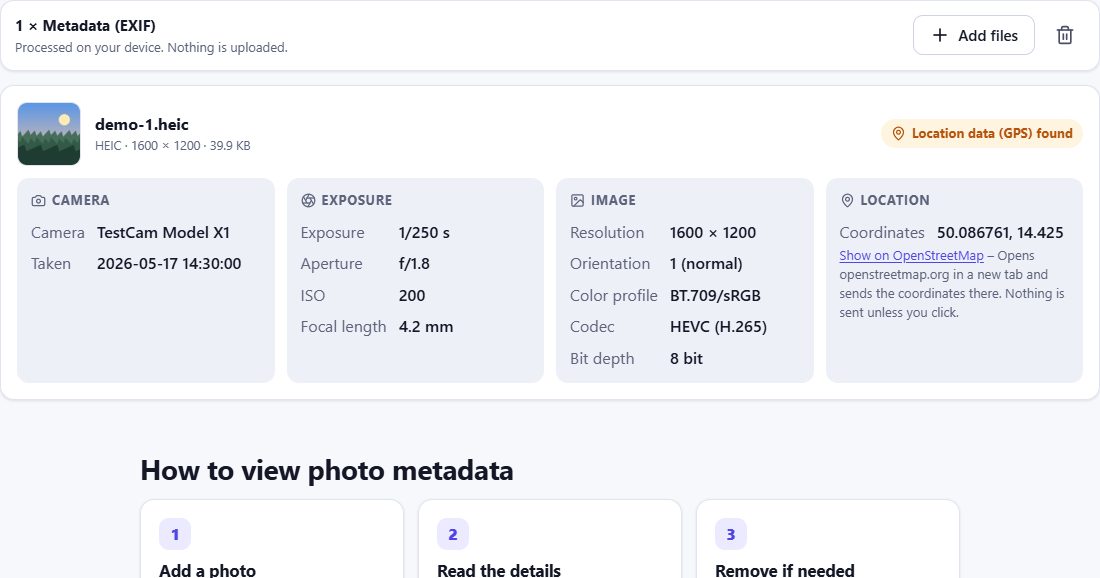
After cleaning, HEIC Studio reads the new file again and confirms that it contains no GPS (or no EXIF at all). You can double-check with the EXIF viewer.
Does the HEIC stay a HEIC?
Yes. HEIC files are cleaned in their original format. Only if you also want a JPG do you need the converter.
Are my photos uploaded?
No. Everything happens on your device.